PpAdobe Acrobat: The Ultimate Guide to Creating, Editing & Managing PDF Files (2026 Edition)
🧩 Introduction
In today’s digital world, documents have gone beyond paper — and PDF (Portable Document Format) has become the universal file standard. Whether you are signing a contract, submitting a project report, or designing a brochure, Adobe Acrobat is the go-to solution for everything related to PDFs.
Adobe, the company behind Photoshop and Illustrator, developed Acrobat to help users create, edit, view, sign, and share PDF documents seamlessly across devices. Over time, Adobe Acrobat has evolved from a simple viewer into a complete document management system trusted by professionals, students, and businesses worldwide.
🔍 What Is Adobe Acrobat?
Adobe Acrobat is a powerful software suite that allows users to create, convert, view, edit, and sign PDF files. It ensures that documents maintain their layout and formatting regardless of device or operating system.
Acrobat is available in two primary versions:
- Adobe Acrobat Reader (Free) – for viewing and commenting on PDFs.
- Adobe Acrobat Pro (Paid) – for advanced editing, creating, and security features.
Whether you are using Windows, macOS, or mobile devices (Android/iOS), Adobe Acrobat provides seamless functionality across all platforms.
⚙️ Key Features of Adobe Acrobat
Let’s explore some of the most useful and modern features that make Acrobat the top choice for PDF management in 2026:
🧾 1. Create & Convert PDFs
Convert Word, Excel, PowerPoint, images, and even web pages into high-quality PDFs. The conversion process maintains fonts, formatting, and layout perfectly.
✏️ 2. Edit PDF Files Easily
With Acrobat Pro, you can modify text, adjust fonts, insert images, or even rearrange pages — just like editing in Word.
💡 Tip from BypassApp.in: You can also scan paper documents and edit them as digital text using OCR (Optical Character Recognition).
📑 3. Combine & Organize PDFs
Merge multiple PDFs or files into a single document. You can reorder pages, add bookmarks, or split files based on size or page numbers.
🧠 4. OCR – Text Recognition
One of Acrobat’s most powerful tools is its ability to recognize text from scanned documents. This makes old paper files searchable and editable, saving both time and storage.
🔐 5. Secure & Sign PDFs
Add password protection, restrict editing/printing, or digitally sign contracts securely with Adobe Sign. The digital signature feature meets global compliance standards.
☁️ 6. Cloud Integration
All files can be saved in Adobe Document Cloud, allowing you to access them anywhere. You can also collaborate with teammates in real time.
📱 7. Mobile Access
Adobe Acrobat Reader mobile app allows you to read, sign, and comment on PDFs even on your phone — perfect for professionals on the move.
💼 Adobe Acrobat Versions and Plans (2026)
| Version | Features | Pricing (Approx) |
|---|---|---|
| Acrobat Reader (Free) | View, comment, fill forms | Free |
| Acrobat Standard DC | Create, edit, sign, convert PDFs (Windows only) | $12.99/month |
| Acrobat Pro DC | Advanced editing, OCR, e-sign, collaboration (Win & Mac) | $19.99/month |
| Acrobat for Teams | Multi-user, admin controls, cloud storage | Custom pricing |
💡 Pro Tip: Students and educators can get special discounts on Acrobat Pro subscriptions.
🧭 How to Install Adobe Acrobat (Step-by-Step)
- Visit the official website: https://get.adobe.com/acrobat/
- Choose Acrobat Reader (Free) or Acrobat Pro Trial (7 days).
- Download and run the setup file.
- Follow on-screen installation instructions.
- Sign in with your Adobe ID or create a new one.
- Once installed, open any PDF file to get started.
🧰 Practical Uses of Adobe Acrobat
- Students: Merge assignments, annotate notes, convert docs to PDFs.
- Businesses: Create secure contracts, invoices, and presentations.
- Designers: Export designs from Adobe Creative Cloud apps.
- Government Offices: Manage e-signatures and digital records.
🔄 Alternatives to Adobe Acrobat
While Adobe Acrobat leads the industry, some free or affordable alternatives exist:
- Foxit PDF Editor
- Nitro PDF Pro
- SmallPDF (Online)
- PDFescape (Web)
These can handle basic editing and conversion, but none match Acrobat’s reliability, cloud sync, and security features.
⭐ Pros and Cons
✅ Pros:
- Industry-leading PDF editing tools
- Reliable OCR & e-signature support
- Cross-platform compatibility
- Secure cloud storage
- Regular updates by Adobe
❌ Cons:
- Subscription-based pricing
- High system requirements on older PCs
🧠 Tips to Maximize Your Acrobat Experience
- Use keyboard shortcuts like
Ctrl + Efor text edit toolbar. - Try “Compress PDF” tool to reduce file size before sharing.
- Add your digital signature certificate for instant document approvals.
- Enable AutoSave in Preferences to prevent data loss.
- Link your account with Adobe Cloud for instant file backup.
📷 Image Suggestions (for your WordPress post):
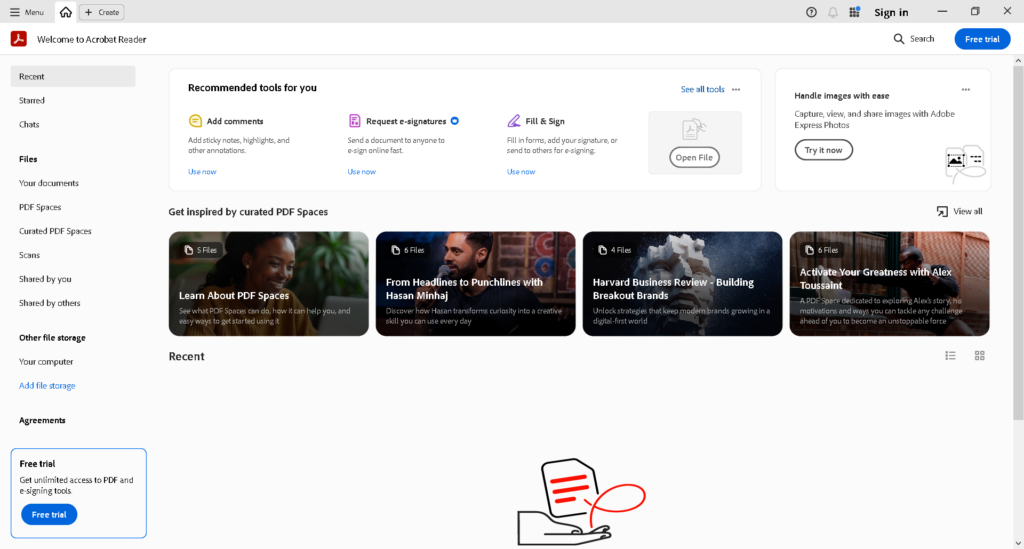
- Screenshot of Acrobat dashboard (Home + Tools view)
- Step-by-step installation images
- Before & after image of a scanned PDF using OCR
- Comparison chart of Acrobat Pro vs Free Reader
- Adobe logo with BypassApp.in watermark
🔗 Official Download Links
- Adobe Acrobat Reader: https://get.adobe.com/reader/
- Adobe Acrobat Pro Trial: https://www.adobe.com/acrobat/free-trial-download.html
🧩 FAQs
Q1. Is Adobe Acrobat free?
Yes, Acrobat Reader is free for viewing, signing, and commenting. For advanced editing and converting, you need Acrobat Pro.
Q2. Can I edit scanned documents?
Yes, Acrobat Pro’s OCR technology converts scanned text into editable digital text.
Q3. What’s the difference between Acrobat DC and Acrobat Pro DC?
“DC” stands for Document Cloud — it enables cloud storage and sharing. Acrobat Pro DC includes all advanced features.
Q4. Can I use Adobe Acrobat offline?
Yes, you can use most features offline. However, cloud and signature features require an internet connection.
🏁 Conclusion
Adobe Acrobat continues to dominate the PDF world in 2026 with its blend of simplicity, power, and reliability. Whether you’re a student, professional, or entrepreneur, this tool is your best companion for managing digital documents securely and efficiently.
If you want a trusted and professional PDF editor, Adobe Acrobat Pro DC is absolutely worth it.
Presented by BypassApp.in – Your Digital Learning Partner.