Epson Printer Resetter Tool – Complete Guide to Fix Epson Errors
Printers have become an essential part of our daily life. Whether it is office work, school assignments, or printing important documents at home, a printer is always needed. Epson printers are popular worldwide because of their print quality and durability. But sometimes, Epson printers suddenly stop working and show errors like “Service Required” or “Waste Ink Pad Counter Full”.
In such situations, the best solution is the Epson Printer Resetter Tool.
In this detailed guide, you will learn:
- What Epson Printer Resetter Tool is
- Why it is needed
- How it works
- Step-by-step usage guide
- Supported printer models
- Benefits and FAQs
Let’s dive in!
What is Epson Printer Resetter Tool?
The Epson Resetter Tool is a small software utility that helps users fix Epson printer errors.
When an Epson printer reaches its predefined limit of prints, it stores the data in its memory and locks the printing function. This is called the Waste Ink Pad Counter or Service Required Error. At this point, your printer refuses to print.
👉 The resetter tool resets these counters back to zero and allows the printer to work normally again.
Why Do You Need Epson Resetter Tool?
Epson printers often face a few common issues where this tool becomes necessary:
- Waste Ink Pad Error
- During printing, a small amount of ink is wasted and stored in the waste ink pad.
- When the pad reaches its limit, the printer shows an error.
- Service Required Error
- This error appears when the printer’s internal memory counter reaches the maximum limit set by the manufacturer.
- Paper Jam or Printing Halt
- Sometimes, the printer suddenly stops printing and keeps blinking error lights.
- Printer Not Responding
- In many cases, the printer does not respond until it is reset.
👉 Instead of spending money at a service center, you can easily fix these problems with the Epson Resetter Tool.
How Does Epson Resetter Tool Work?
The tool works as a software bridge between your computer and the Epson printer.
Here’s the simple working process:
- Install the Epson Resetter Tool on your PC or laptop.
- Connect the printer to your system using a USB cable.
- Run the program and select your printer model.
- Reset the “Waste Ink Pad Counter”.
- Restart the printer.
Once reset, your printer’s memory is refreshed, and it starts working like new again.
Key Features of Epson Resetter Tool
- ✅ Resets the Waste Ink Pad Counter
- ✅ Fixes Service Required error
- ✅ Supports multiple Epson printer models
- ✅ Portable – no heavy installation required
- ✅ Easy to use – just a few clicks
- ✅ Saves time and money by avoiding service center visits
Step-by-Step Guide: How to Use Epson Resetter Tool
Follow these simple steps to use the Epson Resetter Tool:
Step 1 – Download the Tool
Download the resetter tool for your specific Epson printer model.
https://www.mediafire.com/file/qc95aoona8gcjov/Reset_Epson_L1210_L3210_L3250_L3251_L3260_L5290-NEW.rar/file
download Winrar Unzip Software.
PASSWORD: sbz
Step 2 – Connect Your Printer
Use a USB cable to connect your Epson printer to the computer.
Step 3 – Open the Program
- Windows Defender Turn Off
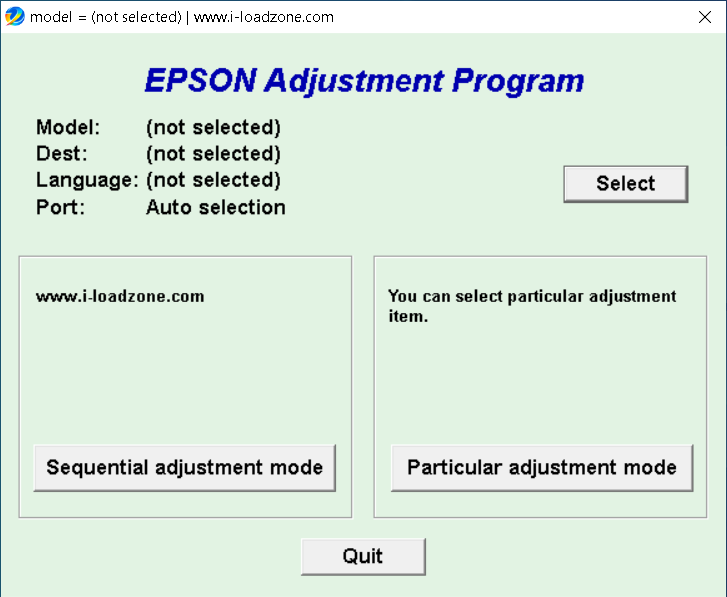
Extract the downloaded file and run AdjProg.exe.
Step 4 – Select Printer Model
Choose your Epson printer model from the list.

Step 5 – Adjustment Mode
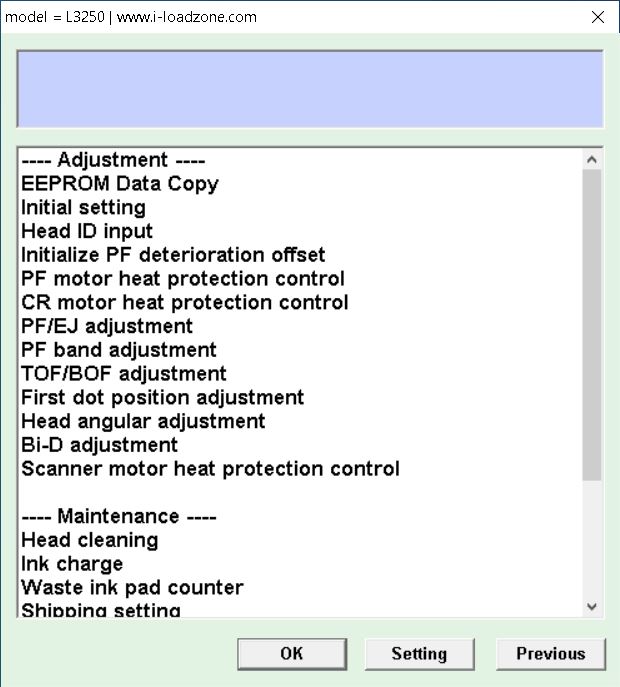
Click on Particular Adjustment Mode.
Step 6 – Reset the Counter
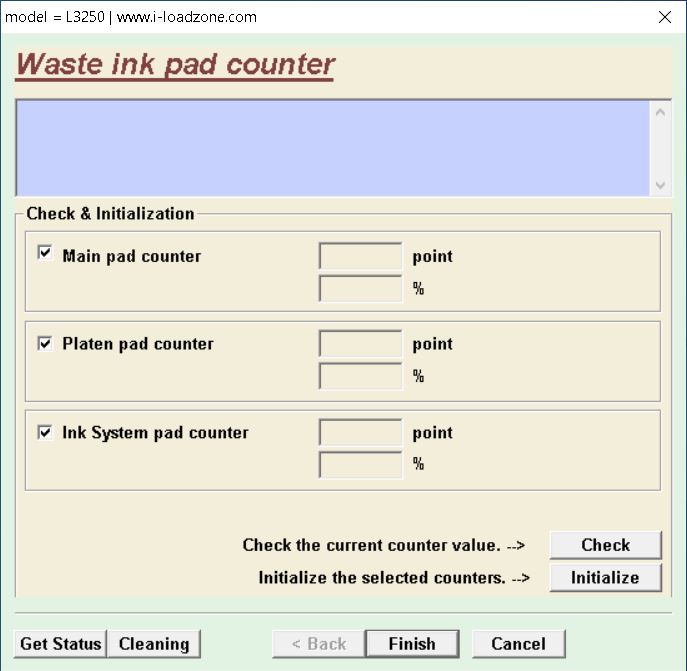
Go to Waste Ink Pad Counter
Click on Check → Then click Initialization.
Step 7 – Restart the Printer
Turn off your printer and switch it on again. Now, your Epson printer will start printing without errors.
Supported Epson Printer Models
The Epson Resetter Tool supports most popular Epson printers, such as:
- Epson L1210
- Epson L3210
- Epson L3250
- Epson L3251
- Epson L3260
- Epson L5290
👉 Always make sure to download the resetter tool version that matches your printer model.
-
Reset Epson L110, L210, L220, L310, L360, L365
Benefits of Using Epson Resetter Tool
- Free and lightweight software
- Easy to use without technical knowledge
- Works offline (no internet required)
- Saves service center costs
- Extends printer life by resetting counters
- Quick solution within minutes
Is Epson Resetter Tool Safe?
Yes, the Epson Resetter Tool is completely safe when downloaded from a trusted source.
It only resets the printer’s internal counter and does not harm your system or data. Many professionals and home users worldwide use this tool daily without issues.
Frequently Asked Questions (FAQs)
Q1. Is Epson Resetter Tool free to use?
👉 Yes, most versions are available for free.
Q2. Do I need a different resetter tool for every Epson model?
👉 Yes, each Epson printer model requires its specific resetter tool.
Q3. Does resetting fix the printer permanently?
👉 No, when the waste ink pad is full again, you will need to reset it again.
Q4. Can I use the tool without the internet?
👉 Yes, it works completely offline.
Q5. Does it work on both Windows and Mac?
👉 Mostly it supports Windows, but for Mac, separate versions may be required.
Conclusion
The Epson Printer Resetter Tool is a must-have solution for Epson printer users. Instead of wasting money at a service center, you can reset your printer at home in just a few minutes.
It is user-friendly, quick, and safe – making it the best option for fixing Waste Ink Pad Counter Full and Service Required errors.
👉 If your Epson printer has stopped working and is showing error lights, simply download the resetter tool for your model, follow the steps above, and enjoy smooth printing again.
to day i will telled you how to slove your epson printer L1210 to L5290 waste ink pad end of service life please contact our service center issue. fix 100% free and easy to use reset epson printer in your home. without waste money and waste time.
so we are happy to help you . please comment if your printer 100 percent working fine.