
Jio Bharat V2 (JBV162W1) Flashing Guide – Software Repair & Dead Phone Fix [2026]
Learn how to flash Jio Bharat V2 (JBV162W1). Fix dead phone, boot loop, logo stuck issues using SPD/Unisoc flash tool. Step-by-step guide.
Introduction
The Jio Bharat V2 (Model: JBV162W1) is a popular feature phone powered by an ASR (ASR Microelectronics) CPU. This model is not based on MediaTek or Qualcomm; it uses an ASR chipset, which requires compatible flashing tools and correct firmware files.
If your phone is dead, stuck on Jio logo, boot looping, or has software corruption, flashing the firmware is the best solution.
This worldwide guide explains:
- How to flash Jio Bharat V2 safely (ASR CPU based)
- Required flash tools and firmware
- Solutions for dead or software-bricked phones
⚠️ Warning: Flashing is a technical process. Using an incorrect file or wrong CPU tool may permanently damage the device.
When Do You Need to Flash Jio Bharat V2
- Phone not powering on (dead phone)
- Stuck on Jio logo
- Continuous restart (boot loop)
- Forgotten screen lock
- Failed software update
Required Tools & Files (ASR CPU Compatible – With Download Links)
🔹 Jio Bharat V2 Flash File (JBV162W1 – ASR CPU Firmware)
- File Type: .PAC / .BIN / .ZIP(depends on package)
- CPU: ASR Microelectronics
- Purpose: Software reinstall / unbrick device
- 📥 Download Tip: Search Google – JBV162W1 ASR Flash File Download bypassapp.in
🔹 ASR CPU Compatible Flash Tool (Important)
Jio Bharat V2 uses ASR CPU, so the following tools are recommended:
- ASR Flash Tool Download / ASR Upgrade Tool (Manufacturer-specific)
- ResearchDownload Tool (ASR-supported versions only)
📥 Download Reference:
password: (bypassapp.in)
⚠️ Note: Do NOT use MediaTek SP Flash Tool or Qualcomm QFIL.
🔹 USB Driver (ASR / Feature Phone Driver)
- Required for proper device detection
- 📥 Download: driver file in the flash tool fiile folder name driver
🔹 Other Requirements
- Windows PC or Laptop (Windows 7/10/11)
- Original USB data cable
- Minimum 50% battery charge
Step-by-Step: How to Flash Jio Bharat V2 (JBV162W1)
Step 1: Install USB Driver
- Install SPD / ASR Unisoc USB Driver on your PC
- Restart the computer after installation
Step 2: Setup Flash Tool
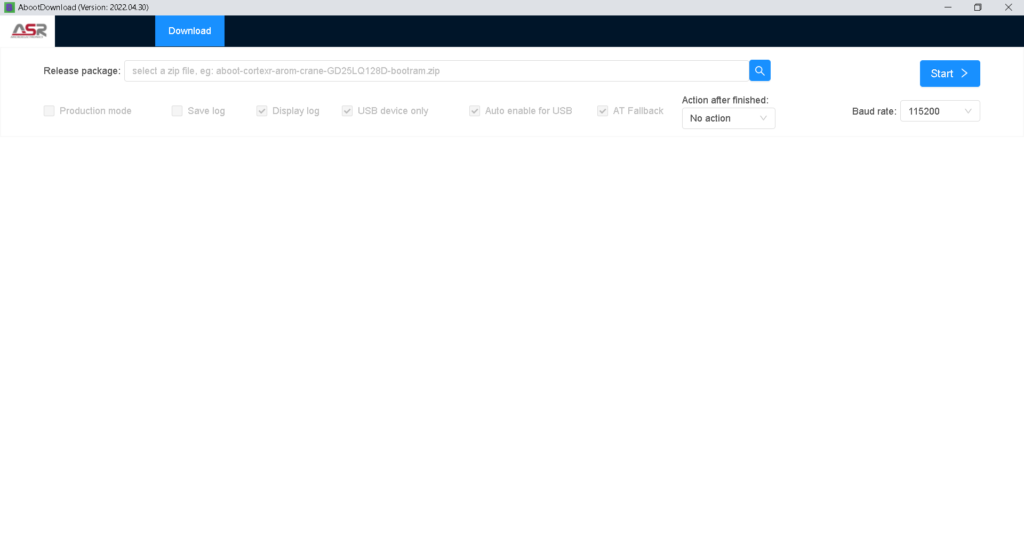
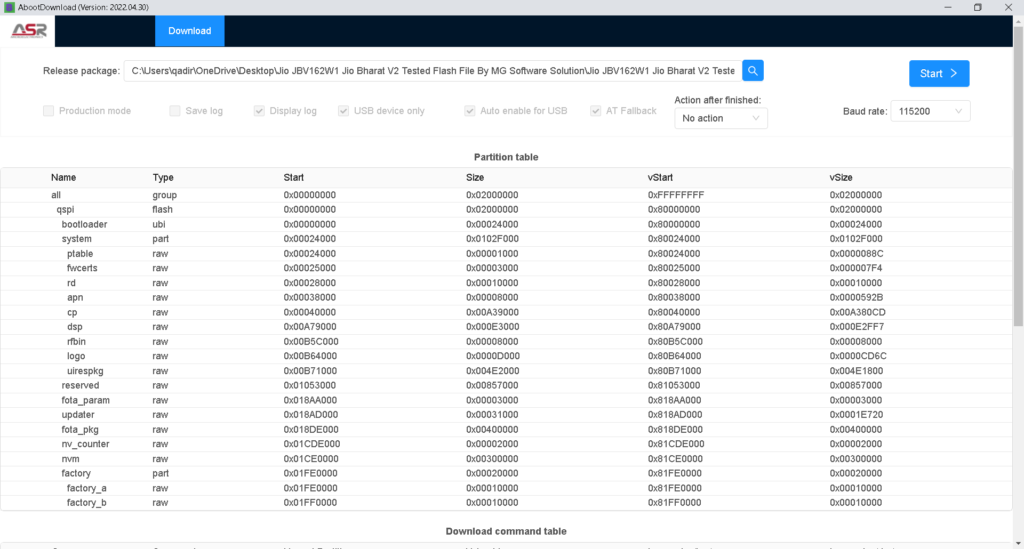
- Open Jio Bharat Phone ASR Cpu Flash Tool By___MG Software Solution LF012, LF062, KW101\aboot.exe
- Click on Load Packet
- Select the JBV162W1 .ZIP firmware file
Step 3: Connect Phone in Flash Mode
- Power off the phone
- Remove battery for 5 seconds and reinsert it
- Connect the phone to PC using USB cable
👉 Flashing will start automatically
Step 4: Wait for Flashing Completion
- Do not disconnect USB cable during flashing
- Wait until Passed / Success message appears
- Phone will reboot automatically
Step 5: First Boot
- First boot may take 5–10 minutes
- Complete Jio setup to start using the phone
ASR CPU vs SPD / Unisoc – Important Clarification (Trust Section)
Many users confuse ASR CPU with SPD / Unisoc chipsets. This clarification is critical:
| Feature | ASR CPU | SPD / Unisoc |
|---|---|---|
| Manufacturer | ASR Microelectronics | Unisoc |
| Tool Support | ASR Flash Tool, limited ResearchDownload | ResearchDownload Tool |
| MTK Tool Support | ❌ No | ❌ No |
| Qualcomm Tool | ❌ No | ❌ No |
✅ Jio Bharat V2 (JBV162W1) uses ASR CPU, so always select tools and firmware accordingly.
Using a wrong CPU tool may result in permanent dead boot.
Common Flashing Errors & Solutions
Device Not Detected
- Reinstall USB driver
- Try another USB port or cable
Flash Failed Error
- Use correct JBV162W1 firmware only
- disable antivirus security real time protection if any file is auto remove.
- Run flash tool as Administrator
Stuck on Logo After Flash
- Reflash firmware again
- Perform factory reset if possible
Important Safety Tips
- Always use firmware for the exact model JBV162W1
- Ensure stable power supply during flashing
- Avoid flashing on low battery laptops
Frequently Asked Questions (FAQ)
Q1. Does flashing delete all data?
Yes, flashing erases all user data.
Q2. Can a dead Jio Bharat V2 be recovered?
Yes, if there is no hardware damage, flashing can recover it.
Q3. What happens if I use wrong firmware?
The phone may become permanently dead.
Disclaimer
This guide is for educational purposes only. The author is not responsible for any damage caused during flashing.
Conclusion
Flashing the Jio Bharat V2 (JBV162W1) firmware is an effective solution for software-related issues such as dead phone, boot loop, or logo stuck problems. By following this guide carefully, you can successfully repair your device.
#Jio Bharat V2 flash file download, #JBV162W1 flashing guide, #Jio Bharat dead phone fix, #SPD flash tool Unisoc
read also:
- sp flash tool download for windows 10 | Everything You Need to Know
- Easy Flashing FRP Bypass 8.0 APK: A Complete Guide
- mrt 3.19 keygen free | download mrt 3.19 | mrt 3.19 crack free download latest
- Frija Tool Download v2.0.23364.3: A Complete Guide to Using It for Best Samsung Firmware
- TFT Tool Download for Free FRP Bypass and Android Unlocking – Latest Version 6.2.1.1
Hunting for that Okbet app download apk. Gotta make sure I get it from a safe place, ya know?
thank your for this article, keep up the good work